UPCOMING: Events

Page 4 of 4 FirstFirst ... 234
Results 31 to 40 of 40

Thread: Death Of A Computer, Breathing New Life Into It!

  1. #31
    Join Date
    05-05-2005
    Location
    San Antonio, Texas
    Posts
    3,428

    Default

    After installing and updating Windows and all my other programs, I've come to the conclusion that the Phenom II X4 is really fast. The processor coupled with the G-Skill PC3 1333 makes for an awesome budget machine.

    Phenom II X4
    Pro-fast right out of the box, relatively low cost, L3 cache.
    Con-125 watts (ouch), stock heatsink fan is loud when running full blast (I broke my Artic Cooling heatsink).

    I have a grip with Newegg regarding the BIOSTAR A770E3 motherboard. On Newegg, their description states that the motherboard is only capable of handling DDR3 1333 but the bios clearly goes up to DDR3 1600. If I had known this I would have purchased the DDR3 1600 instead as it is only $1 more than the DDR3 1333. I retract this comment. See post #36 for explanation on retraction.

    My WEI (Windows Experience Index) is a 3.4 :( . I figured it would be higher but my older video card is holding it back. However, I know that the WEI is not the end all and be all of computer performance indicators.

    I would like to get another set of G-Skill 2x2 gigabytes DDR3 1333 for a total of 8 gigabytes of memory. I would also like to get a second hard drive so I can try out RAID for the first time. A new video card would be nice but I don't game so it's not an essential upgrade at this time. Lastly, a new aftermarket heatsink would be nice because the stock one sounds like a 747 on takeoff.

    All in all I'm satisfied with my purchases.

    COMMENTS, CONVERSATION, CRITICS, SUGGESTIONS???

    Christopher
    Last edited by cbianco; Thu, 21st Jul 2011 at 07:01 PM. Reason: Add additional info.

  2. #32
    Join Date
    03-04-2005
    Location
    NE San Antonio
    Posts
    11,696

    Default

    if you dont mind me asking, what did you spend on this build?
    Ace
    The Shade Tree Craftsman


  3. #33
    Join Date
    05-05-2005
    Location
    San Antonio, Texas
    Posts
    3,428

    Default

    Quote Originally Posted by hobogato View Post
    if you dont mind me asking, what did you spend on this build?
    Seagate Barracuda 500GB Hard Drive -Bare Drive $39.99
    BIOSTAR A770E3 Motherboard $49.99
    AMD Phenom II X4 955 Black Edition Quad-Core Processor $119.99
    G.SKILL 4GB (2 x 2GB) DDR3 1333 Memory $35.99
    LOGISYS 480W Power Supply $14.99 (I totally cheaped out on this power supply and I will pay for my cheapness if I ever upgrade.)

    So ~$261 + shipping.

    HOWEVER, keep in mind that I salvaged (from my old computer) my case, dvd burner, video card and wireless card. If you needed these things too expect to pay ~$100-150 more. Keep in mind that this doesn't include and operating system (I reused my old one).

    Christopher

  4. #34
    Join Date
    05-05-2005
    Location
    San Antonio, Texas
    Posts
    3,428

    Default

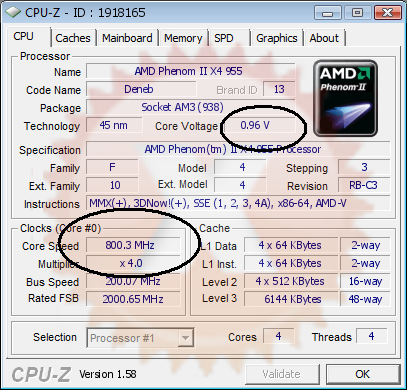
    I'm fustrated that the BIOS keeps "dropping down" the voltage and frequency of the processor. Anyone know the setting I should be looking for in the BIOS? I looked through the manual but didn't see anything.

    Christopher


  5. #35
    Join Date
    04-01-2009
    Location
    Northeast San Antonio
    Posts
    586

    Default

    Chris I have 2x4= 8g of Corsair Vengeance DDR3 1600 I am willing to trade for 8gigs of DDR3 1333 I paid 119.00 ish
    "qui tacet consentire videtur,"
    "he who is silent is understood to consent"

  6. #36
    Join Date
    05-05-2005
    Location
    San Antonio, Texas
    Posts
    3,428

    Default

    Quote Originally Posted by robalv View Post
    Chris I have 2x4= 8g of Corsair Vengeance DDR3 1600 I am willing to trade for 8gigs of DDR3 1333 I paid 119.00 ish
    I appreciate the offer but I must decline.

    After a bit of research my board overclocks to DDR3 1600 specs but only handles DDR3 1333 natively. So if I decide that I don't want to overclock, the 1600 ram will most likely default to 1333 (or possibly not work). After further research, I found that people have had mixed success with 1600 on my board.

    Christopher

    (Comment retracted in post #31)
    Last edited by cbianco; Thu, 21st Jul 2011 at 07:01 PM. Reason: Add info

  7. #37
    Join Date
    04-01-2009
    Location
    Northeast San Antonio
    Posts
    586

    Default

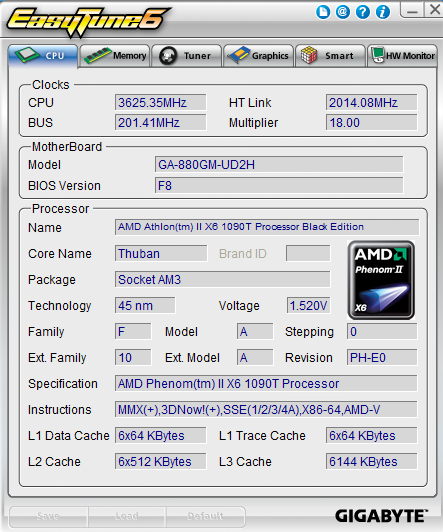
    how did you take the screen shot of your ez tuner?
    and no prob on the memory
    "qui tacet consentire videtur,"
    "he who is silent is understood to consent"

  8. #38
    Join Date
    05-05-2005
    Location
    San Antonio, Texas
    Posts
    3,428

    Default

    Quote Originally Posted by robalv View Post
    how did you take the screen shot of your ez tuner?
    and no prob on the memory
    It's actually CPUz not ez tuner. I prefer to overclock through the BIOS.

    To take a screen shot of the active window press "alt + print screen" at the same time. Next paste your screen shot into MS Paint and save it. I also upload to Photobucket and hotlink, when I'm posting on MAAST. I hate those small thumbnails that you have to click on when uploading directly to MAAST.

    HTHs.

    Christopher

  9. #39
    Join Date
    04-01-2009
    Location
    Northeast San Antonio
    Posts
    586

    Default

    thanks, I found snipper tool
    Last edited by robalv; Thu, 21st Jul 2011 at 09:02 PM.
    "qui tacet consentire videtur,"
    "he who is silent is understood to consent"

  10. #40
    Join Date
    05-05-2005
    Location
    San Antonio, Texas
    Posts
    3,428

    Default

    Found it... It wasn't the BIOS, it was Windows. The power management scheme I set for my computer "allowed" for the processor to be reduce to 5% usage when idling. I adjusted it a bit to suit my needs better. Less delay now when going from idle to full blast.

    Christopher

    Quote Originally Posted by cbianco View Post
    I'm fustrated that the BIOS keeps "dropping down" the voltage and frequency of the processor. Anyone know the setting I should be looking for in the BIOS? I looked through the manual but didn't see anything.

    Christopher


Tags for this Thread

Posting Permissions

  • You may not post new threads
  • You may not post replies
  • You may not post attachments
  • You may not edit your posts
  •