Golly jee guys, all I want to do is to keep it from auto-refreshing. Im sure its something I did and should be a simple fix as in a setting somewhere... Thanks so far though.

 Web Member

Golly jee guys, all I want to do is to keep it from auto-refreshing. Im sure its something I did and should be a simple fix as in a setting somewhere... Thanks so far though.
Web Member
safari is my favorite browser, it is much faster than even firefox. however, the plugin support from firefox beats out safari IMOOriginally Posted by LoneStar

Web Member
Jim, sorry for running off subject. Under your advanced tab in internet options, have you clicked the button at the bottom labelled reset to defaults?
30L w/10gallon sump 4xt5ho; Up and running:125g long, 30g sump, 50g fuge.
"Life is tough, but it's tougher when you're stupid.”
John Wayne
Charter Member
My brothers bigger than your brother.
Cliff
Web Member
Yep, I did in fact do that, then I did a system restore to a previous date.
Web Member
Hey Jim,
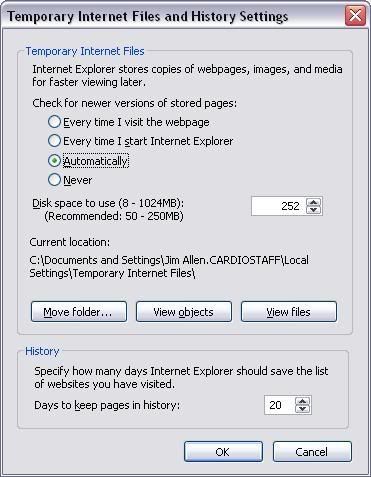
IE doesn't have an "auto-refresh" setting that can really be turned on or off. There is however a setting that can allow you to get control of how often pages are loaded into cache, and therefore "refreshed". Check the setting in >Tools>Internet Options>General>Temporary internet settings....like the pic below
Set that to "Anytime I visit the webpage". Leaving it set to "Automatic" will rely on the refresh settings that have been embedded in the HTML.
Try that and see if that helps the refresh problem.
“Never be afraid to try something new. Remember, amateurs built the ark. Professionals built the Titanic.”
-Jim
Web Member
Oh, and one more thing about IE. Since the beginning, Microsoft has always done things their own way. The W3C has determined and presented guidelines for HTML pages, and Microsoft has avoided adopting these guidelines. The end result, if the webpage has been written properly to these guidelines, then it should display the same in EVERY browser. Unfortunately, with IE not being compliant, any page written correctly may not actually display correctly in IE. And the result of that is that most older webpages have been designed specifically to be displayed correctly in IE, which has been the most popular until recent years. Now that there has been a shift in browser dominance (see this link if you want numbers), more pages are written in proper HTML.
That being said, I prefer Firefox, but I also have some application websites that require ActiveX, so I still use IE. When I can, I use FF with the IEtab extension to view pages that have designed for IE.
“Never be afraid to try something new. Remember, amateurs built the ark. Professionals built the Titanic.”
-Jim
Web Member
ALL very true...and the use of browsers other than IE is growing but keep in mind that the link you posted to the "numbers" is only relating to users that have visited the W3S site and that is primarily college students. The majority of internet surfers are still on IE and the numbers there still far out way any other browser. Which mean websites have to work on IE first before any other browser.
Sorry for the SPAM.
Web Member
Ah, thanks, I missed that fact. I got to the numbers from a link on the W3C page.
This is true, even the numbers page I linked indicate this...if you add up the IE6 and IE7 numbers.The majority of internet surfers are still on IE and the numbers there still far out way any other browser. Which mean websites have to work on IE first before any other browser.
So, until IE8 (which should be W3C compliant), we have to deal with pages not being written in proper HTML.
“Never be afraid to try something new. Remember, amateurs built the ark. Professionals built the Titanic.”
-Jim
Web Member
I did not know that... very good news! It's about darn time! I hate cross browser testing! LOL!

 Reply With Quote