UPCOMING: Events

Results 1 to 10 of 10

Thread: speaker/audio question (stupid one)

  1. #1

    Default speaker/audio question (stupid one)

    This is a stupid question but i'm not sure so I'll ask anyway. Is there a speaker system/surrond system that can be hooked up to both my computer and tv at the same time. I don't need a dvd player or any of that, just speakers. Just so when I wanna listen to music on my computer I can do that, and when i wanna watch a movie I can do that as well.
    GUNS UP

  2. #2
    Join Date
    02-25-2008
    Location
    Way out West. Culebra and 1560
    Posts
    5,347

    Default

    you could find an adapter to hook them up to a TV. That will be cumbersome though, as you would have to switch the adapter, and hook everything back up. There may be some audio receivers that will have hook ups for the audio out of the soundcard. That audio out would sacrafice the quality of using 5.1 or the like due to the fact that the audio out port is a single output.
    Conversely, (and probably your best bet) you could plug your TV into the audio in on the computer and turn the volume up on the audio in. The only bad part there is your computer would have to be on when you want sound from the TV.
    200g-No Corals Yet!


  3. #3
    Join Date
    02-03-2008
    Location
    bayou vista on the bay
    Posts
    774

    Default

    you can get an adapter from your computer to regular rca plugs like this


    http://www.radioshack.com/product/in...entPage=family

  4. #4

    Default

    this will depend on the connections for your video card and your tv, but there are home theater systems which will do both, just find out what connections you need and get the corresponding home theater system.

  5. #5

    Default

    oops. meant to say sound card, not video

  6. #6

    Default

    Are you planning on watching movies on your computer through the new speakers? And listen to the tv through the new speakers?

    Then you'll need a simple reciever/speaker package. JimD just got a sony one for $300(although his came with a dvd player too). Connect the computer to the reciever via the cable subsailor mentioned.

    As for hooking up the tv to the reciever, you first must check to see if there is a audio out jack on your tv. If you do not have audio out, well your SOL. If you do have an audio out, then just connect it to the reciever via RCA cables (or optical if you tv has that).

  7. #7
    Join Date
    09-02-2006
    Location
    Corpus Christi, TX
    Posts
    1,827

    Default

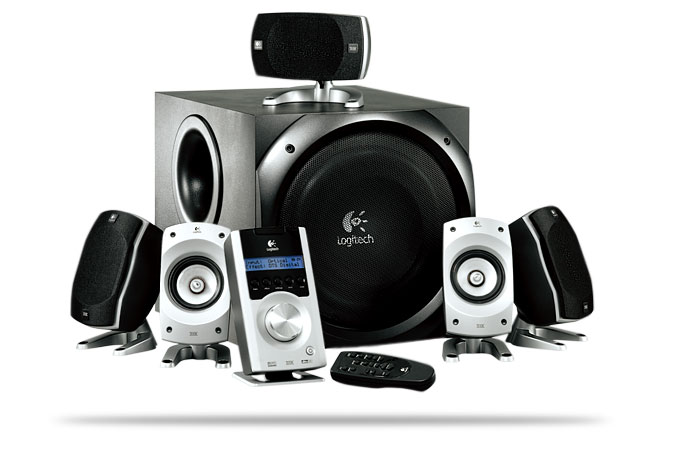
    You'll most likely need a digital audio output (either fiber optic or coax) on one of each devices for true digital surround sound. It can be done with some Logitech Speakers. Here is an example of some speakers I set up for my brothers friend 3 years ago.

    TV - Fiber Optic Audio Cable

    Computer - Coax Audio Cable

    Or Vice Versa

    Logitech Z5500 Digital

    picture belongs to www.logitech.com

    Is my Kung-Fu Good???

    -David
    Last edited by SoLiD; Thu, 29th May 2008 at 06:49 PM.

  8. #8
    Join Date
    08-01-2006
    Location
    San Marcos
    Posts
    2,373

    Default

    Is your computer hooked up to your tv?? My computer has a media center that lets me wacth tv. So it's hooked up to my tv and my surround. via the tv!!
    Is Reef Madness Catchy???

  9. #9

    Default

    Thats a pretty good solution too.

    Like stated before...figure out your connections used for your audio outputs (on both computer and tv) and then you can figure out what system to look into getting.

  10. #10
    Join Date
    09-02-2006
    Location
    Corpus Christi, TX
    Posts
    1,827

    Default

    Quote Originally Posted by apedroza View Post
    Is your computer hooked up to your tv?? My computer has a media center that lets me wacth tv. So it's hooked up to my tv and my surround. via the tv!!
    Easy Anthony. You don't want stir up a hornet's nest lol . Yes, that is another option, but I involves a new OS, TV tuner card, and setup knowledge. It can be done though.

Tags for this Thread

Posting Permissions

  • You may not post new threads
  • You may not post replies
  • You may not post attachments
  • You may not edit your posts
  •